Chegatta Mobile Apps: Clock In, Shifts, Payslips & Contracts in Your Pocket
Native iOS & Android apps + PWA secure link. Clock in with GPS, manage shifts, payslips, contracts, time off & profile — offline capable, fingerprint login.
The Chegatta experience is not just a website. Every worker gets a native mobile app (iOS & Android) and a secure browser link (PWA — no install) — both write to the same verified shift record.
No separate logins. No re-typing. Everything from clock-in to payslip in one pocket.
At a glance: 6 tabs, everything you need
The app bottom nav is always there: Home, Shifts, Payslips, Contracts, Time Off, Profile. No hidden menus — whether you are a waiter, a nurse, or a site manager, you tap what you need in one step.
1. Sign in — fast, secure, trusted device

- Email + password with show/hide eye
- Sign in with Fingerprint (Face ID / fingerprint on registered device) — one tap after first login
- Forgot Password? and Join Organization for new temps
- After first login, your phone is remembered as a Trusted Device — the same fingerprint check that stops buddy punching on the kiosk
Pro tip for managers: Enable fingerprint login in Profile → Security — new temps onboard in seconds without a password reset queue.
2. Home Dashboard — the single source of truth
The dashboard is the worker’s day in one screen — and it changes with their state.
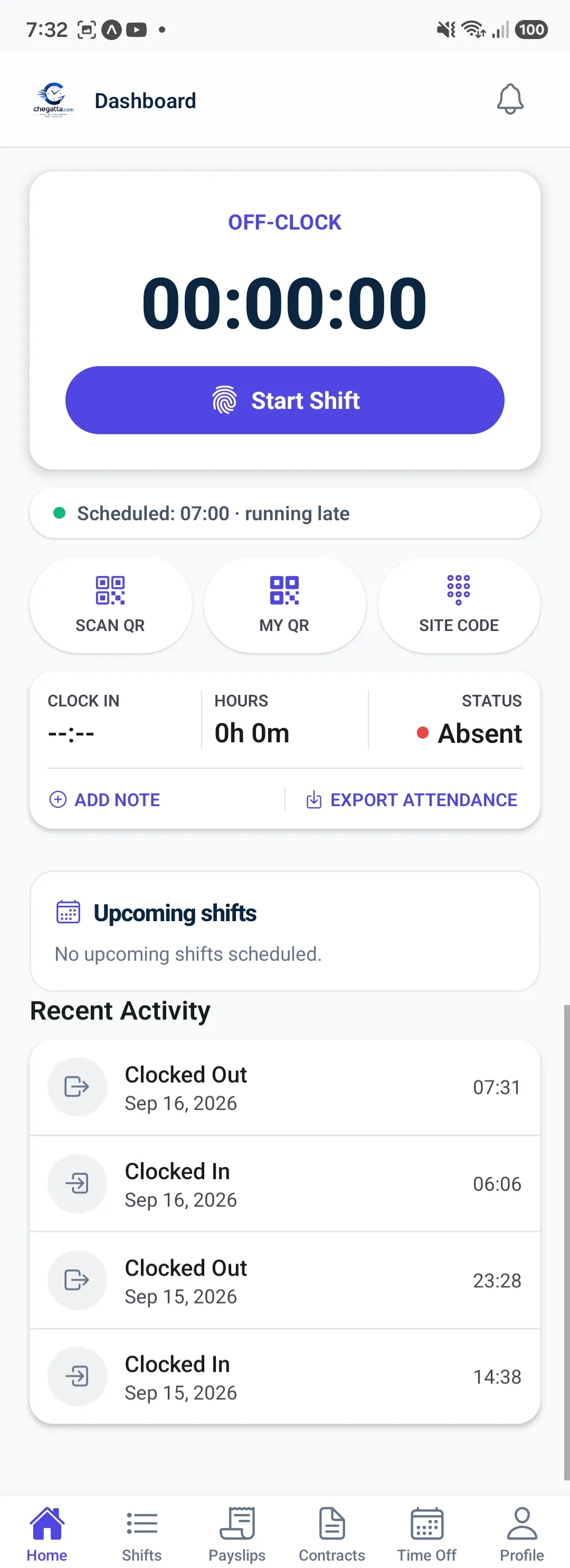
Off-clock (before shift)
- Huge timer 00:00:00 and purple Start Shift button
- Scheduled: 07:00 · running late — so no one forgets
- Three quick actions: SCAN QR (scan site QR at the gate), MY QR (show your personal badge), SITE CODE (type a site code if camera fails)
- Clock In / Hours / Status —
--:-- / 0h 0m / Absentwith Add Note and Export Attendance
On-clock (after tap)
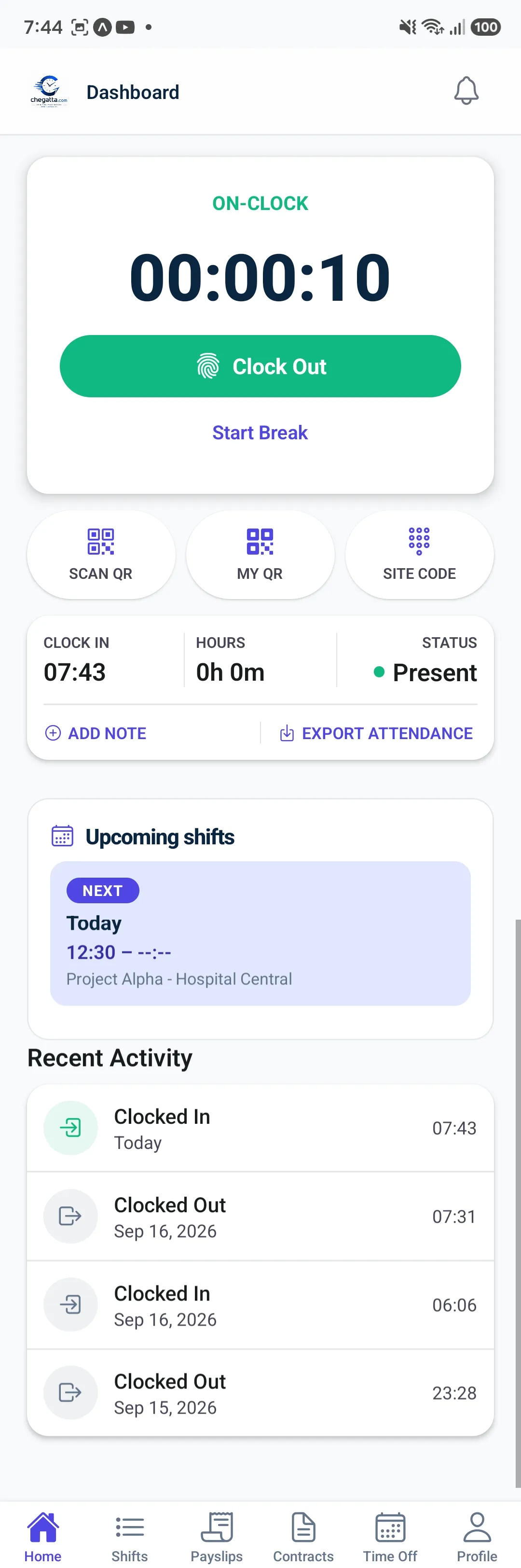
- Timer starts 00:00:10, green Clock Out takes over, plus Start Break
- Clock In 07:43 / Hours 0h 0m / Status Present — hours update live
- Upcoming shifts card shows NEXTToday 12:30 — Project Alpha - Hospital Central — so the worker knows what’s next
On break
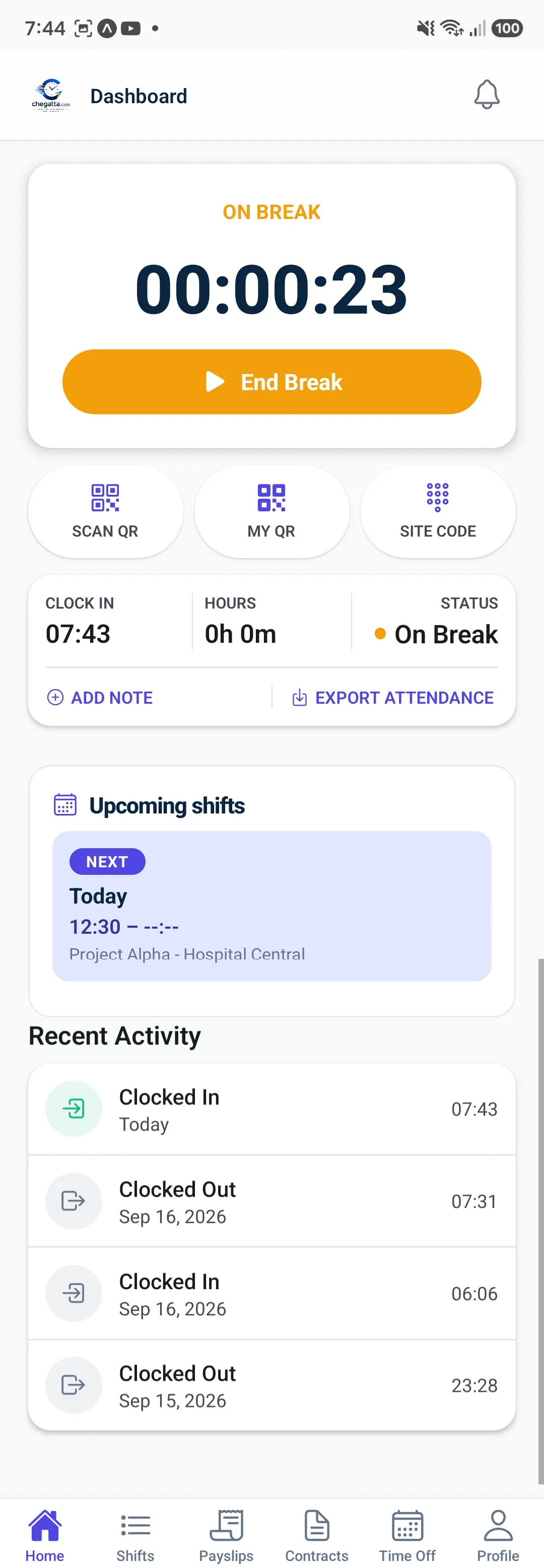
- Orange ON BREAK 00:00:23 and End Break — no confusion
- Status On Break and recent activity still visible
Why it matters for operations: The same shift record powers payroll — breaks are deducted, overtime is split, night premium +25% is added — all from this one dashboard, whether the punch came from the app or the secure browser link (PWA).
3. Shifts — your clock-ins day by day
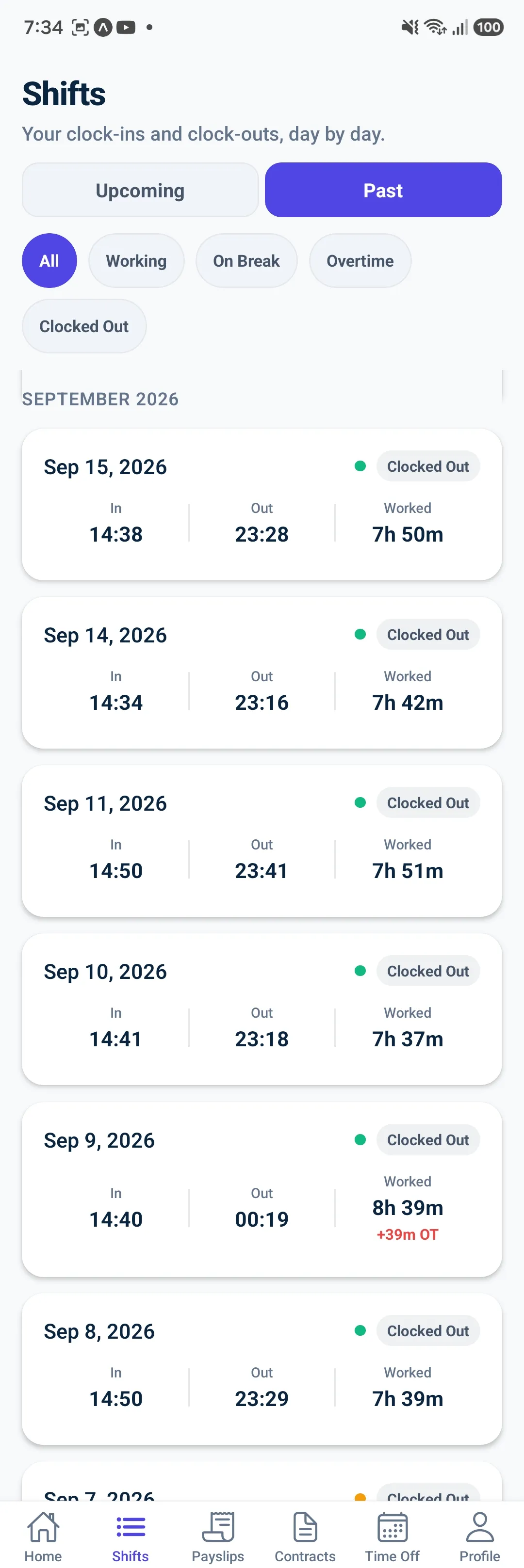
- Tabs: Upcoming / Past — and filters All, Working, On Break, Overtime, Clocked Out
- Past list: Sep 15: In 14:38 Out 23:28 Worked 7h 50m, Sep 9: 8h 39m +39m OT in red
- Managers get Real-Time Attendance (
Status: Present/Absent/On Break) with GPS polygon check per site — same data that feedsReports → Attendance Insights
4. Leave (Time Off) — request to approval without email

- Leave Balances — Vacation, Sick Leave, Personal Leave, Unpaid Leave per year, at a glance
- My Requests — Vacation Sep 30→Oct 1 (2 days) PENDING, Sick Sep 1→2 APPROVED (Flu), Vacation Aug 22 REJECTED — with Cancel Request where allowed
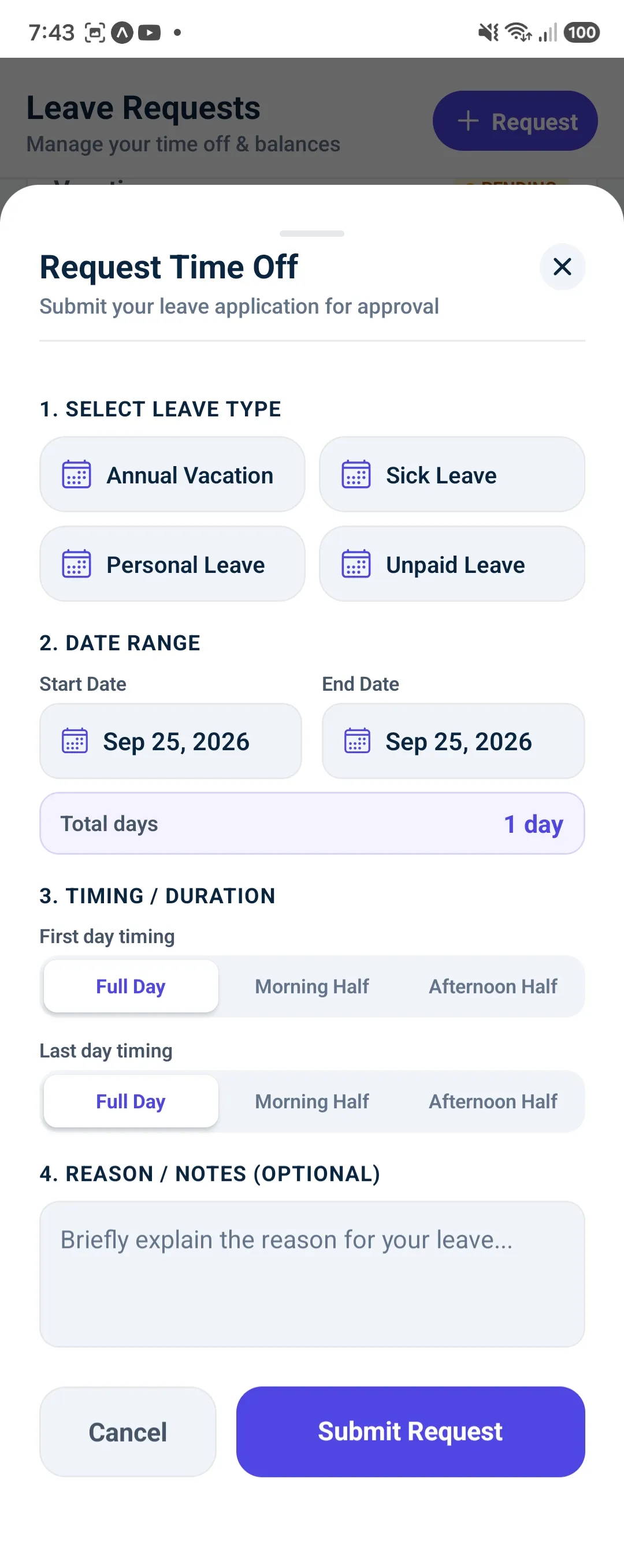
How to request in 4 taps:
- Select Leave Type — Annual Vacation / Sick / Personal / Unpaid
- Date Range — Start/End with auto Total days: 1 day
- Timing / Duration — Full Day / Morning Half / Afternoon Half for first and last day
- Reason / Notes (optional) → Submit Request
Manager approves in one tap — holiday calendars block conflicts automatically.
5. Contracts — from hired to shift-ready in 7 minutes
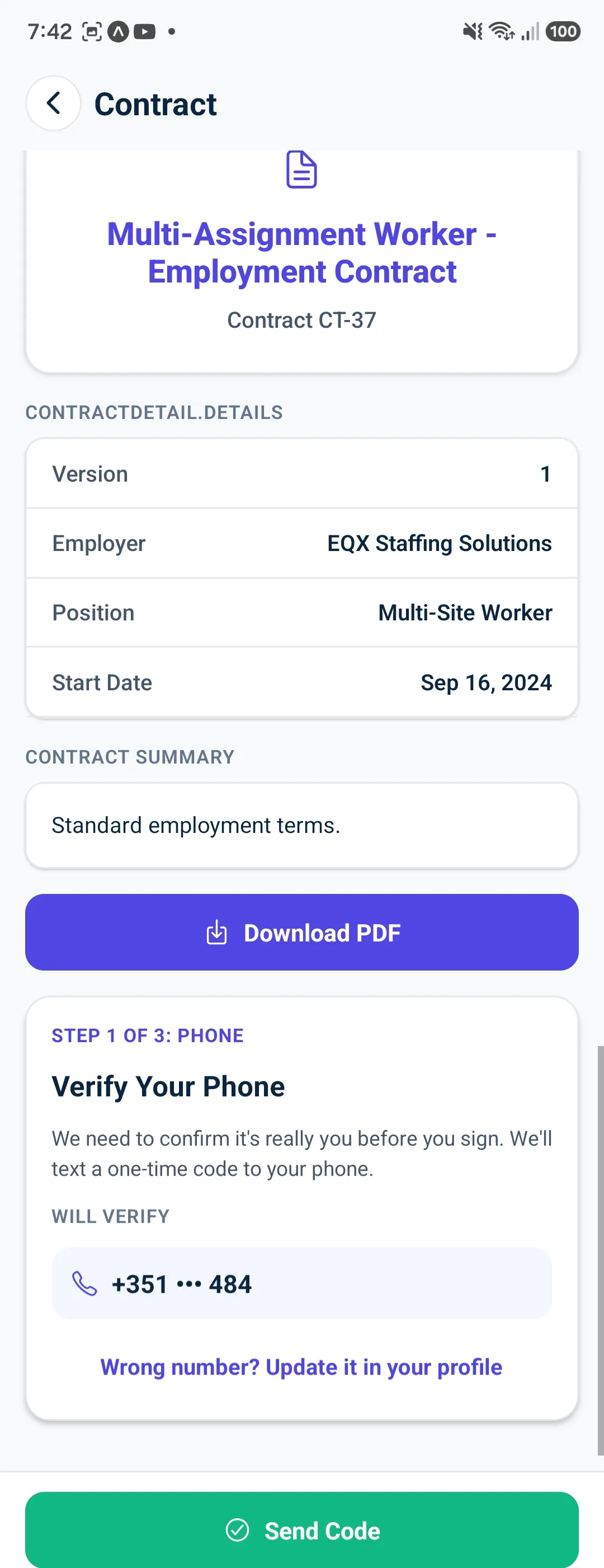
- Contract Detail:
Version 1, Employer EQX Staffing Solutions, Position Multi-Site Worker, Start Date Sep 16, 2024 - Download PDF and Contract Summary (
Standard employment terms) - Signing flow (Step 1 of 3: Phone): Verify Your Phone — we text a one-time code to
+351 ••• 484→ Send Code (green). Then SMS code → Face ID/fingerprint on your registered device → SHA-256 hash anchored, hash-chained audit, Signing Certificate with public verify page
What this means for staffing agencies: A temp is hired at 09:00, signs at 09:07, clocks at 14:00 — no printer, no courier, same app.
6. Profile — everything personal in one place
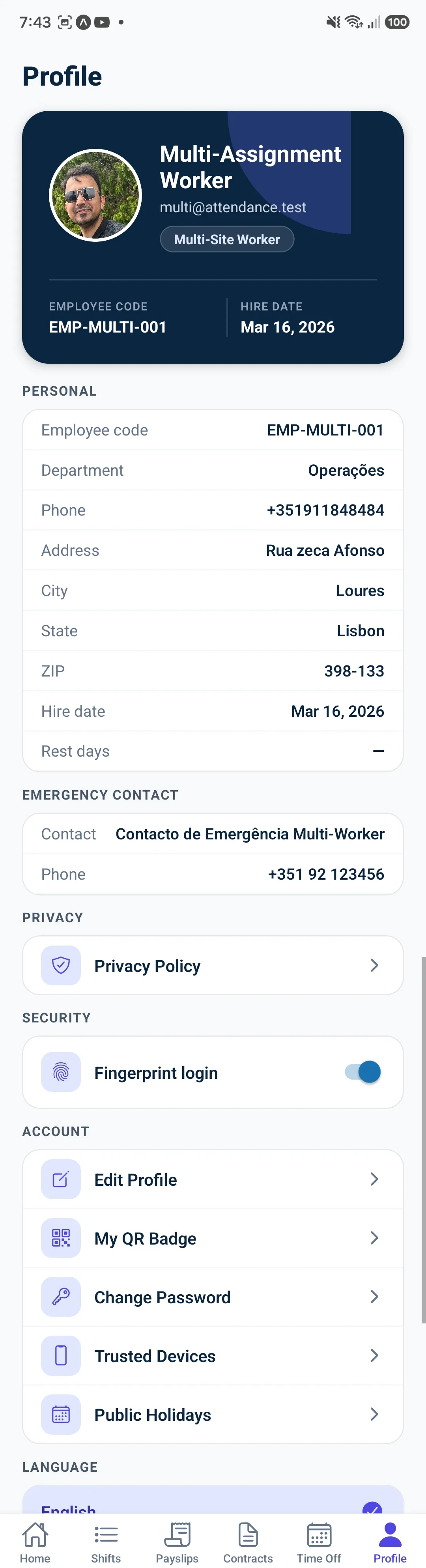
- Header:
Multi-Assignment Worker / multi@attendance.test / Multi-Site Workerwith photo,EMP-MULTI-001/ Hire Date Mar 16, 2026 - Personal:
Employee code, Department Operações, Phone +351911848484, Address Rua Zeca Afonso, City Loures, State Lisbon, ZIP 398-133 - Emergency Contact:
Contacto de Emergência Multi-Worker +351 92 123456 - Privacy: Privacy Policy →
- Security: Fingerprint login toggle (on)
- Account: Edit Profile, My QR Badge, Change Password, Trusted Devices, Public Holidays
- Language:
English(alsoPT/ES/FR— full internationalization)
Offline note: The mobile apps queue punches when there’s no signal and sync when back. The PWA secure link needs signal — keep the app for basements and remote fields.
Web or app — your choice, one record
Workers can open the secure URL in any browser (PWA — no install) or install the native app from App Store / Play Store. Both write to the same verified shift — time + GPS polygon + device fingerprint — so payroll, compliance (PT 5y / ES 4y) and audit are identical.
Download coming soon — until then, every worker can clock in today via the secure browser link your manager shares. The native apps for iOS & Android are live in Expo Go for testing and will be in stores on launch — same screens you see above.
Related guides
- Kiosk Time Clock — when a shared tablet is better than a phone
- GPS Geofencing — how the fence decides Inside vs Outside
- Offline Clock-In — phone queue vs tablet retry
- Digital Signature — full Trust Service proof
Start free — no credit card
GPS + QR kiosk clock-in, geofencing & SEPA payroll in one place. Setup in 2 minutes.